December, 2013
now browsing by month
Building a sliding folder one has to fill the sliding folder with a item, app or folder …
It would be nice, if one could put an existing folder into the sliding folder. So it would be faster to rearrange the desktop.
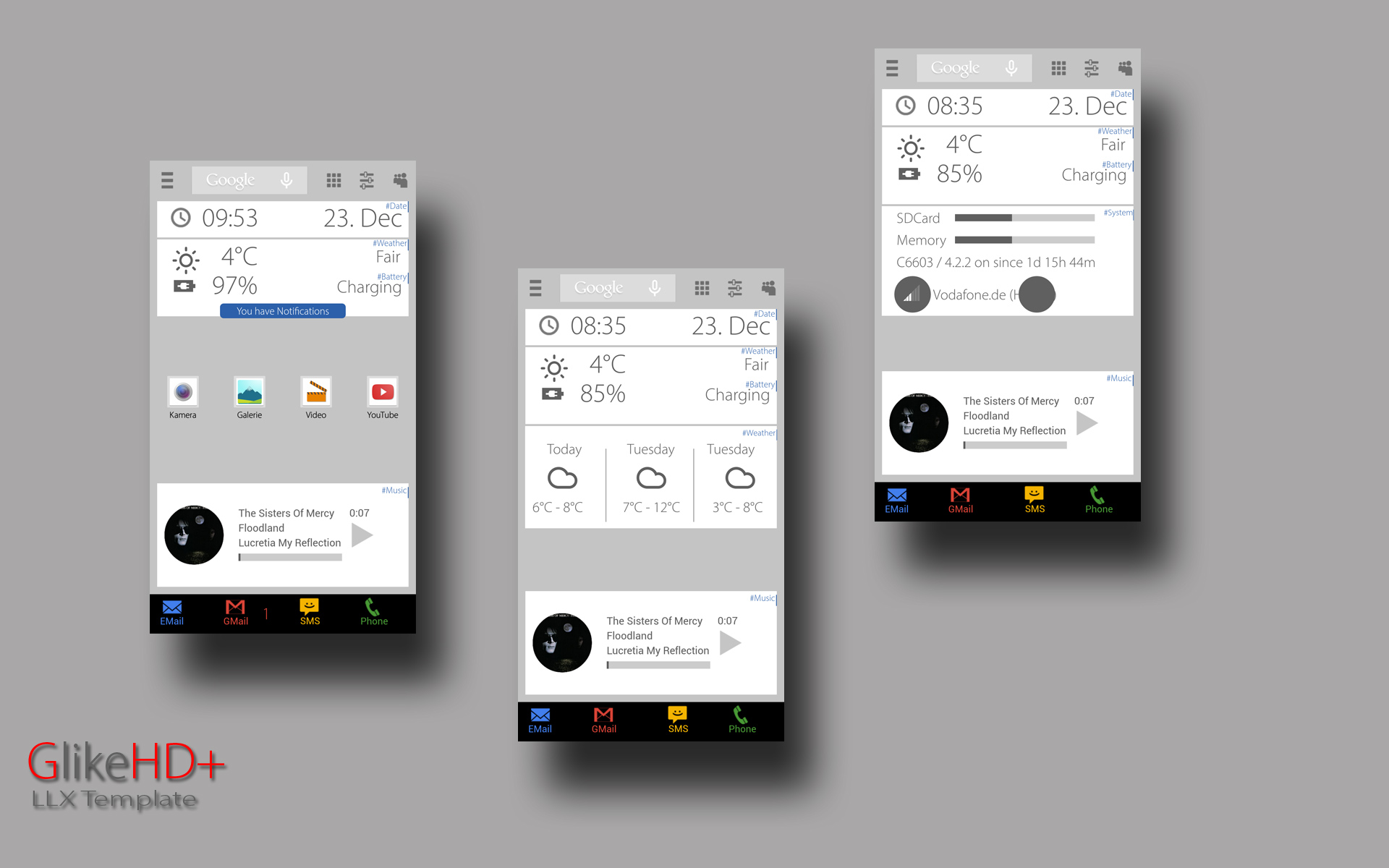
]]>GLike HD+
Last Theme before Holidays.
Remake of my GLike HD Theme.
Now with LL Folders instead of PopUp-Widget
and some extras 😉
Lightning Launcher eXtreme
Zooper Widget Pro
Media Utilities
Simple Rss Widget
Contacts+ Widget
Now Icons
Please watch the Video:
Soon available at Play-Store for Special-Holiday-Price 😉
https://play.google.com/store/apps/details?id=de.werksmannschaft.lltemplate.glikehdplus



Would it be possible to have in desktop settings a ‘sub-folders’ settings to set the default settings of all folders?
I’m thinking more specifically in the app drawer, I have a lot of folders and the only way now is to save/apply the style.
]]>Add a ‘close all folders and open folder <x>’ action?
For example I have bottom row of buttons that open separate folders. If I press button A then B, both folders appear on top of each other. I’d like it if I clicked button A, that all other folders closed, or is there another way to do this?


Small bug:
If you set the long press back button to ‘search app’, it opens the drawer with the search bar active…but when you release the back button it close the search bar…so you can’t search.
]]>What about different image/icon options based on the state of the item… (toggle switches)?
I make shortcut for LL action “do nothing” in folder..
then copy style from other item from outside..
My shortcut disappear but I think LL still have that shortcut somewhere (but not visible in my folder)
Is this already posted or I am the only one have this “style” problem?
]]>In folders window, the ‘top’ and ‘height’ values (and maybe ‘left’ and ‘width’ too) are not stored in backups.
I only tried it once, because I don’t like to backup/restore very much.
Could someone confirm this?
]]>Suggestion: in a lot of the dialogs where you need to choose a number it is measured in pixels.
My suggestion is to add in those dialogs more dynamic ways to imagine the result:
1) easy: if the dialog refers to height, the maximum will be the height of our screen. The same with width. Instead of the actual 2000 by default.
2) hard: at the same time we are introducing the number it will be very easy to imagine the result if a line at the left/bottom of the screen would be drawing with the same size we are introducing. (Hard verb tenses, sorry if there are mistakes)
]]>Folders on desktop odd behaviour.

Folders on desktop odd behaviour.
I’m using llx v9 on an i9300 with a 4.4.2 rom. I can’t quite pin down what the criterion for invoking this bug is, but it happens fairly regularly.
The bug, I’ve created a folder within the app drawer which contains all the google apps. Then on a desktop I create a shortcut which opens that folder. All fairly normal so far.
Every now and again, taping the shortcut on the desktop will open the folder, but the icons inside do not register being tapped on.
If I open the app drawer, then open the folder and tap on an app, it launches fine.
The screenshot shows the folder “el’goog” that has been opened on the desktop from the shortcut. But the apps won’t start.
Ok, extra weird thing, below the opened folder on the desktop is a calendar widget. (the coloured squares on the left side off the screen are the calendar entries). Inside the folder the area directly above the calendar widget that has the calendar app icon and the google settings icon, I can touch the screen and scroll the underlying calendar widget. It’s as if the opened folder has been rendered but then fails to receive input events on it.
If I could do a video it’d be much easier to show.
Bit more background. I cleared the data for llx, uninstalled it. Reinstalled llx, created the folder in the app drawer and the problem persisted.
I’ll see if I can get some log files for it.
]]> D5 Creation