June, 2014
now browsing by month
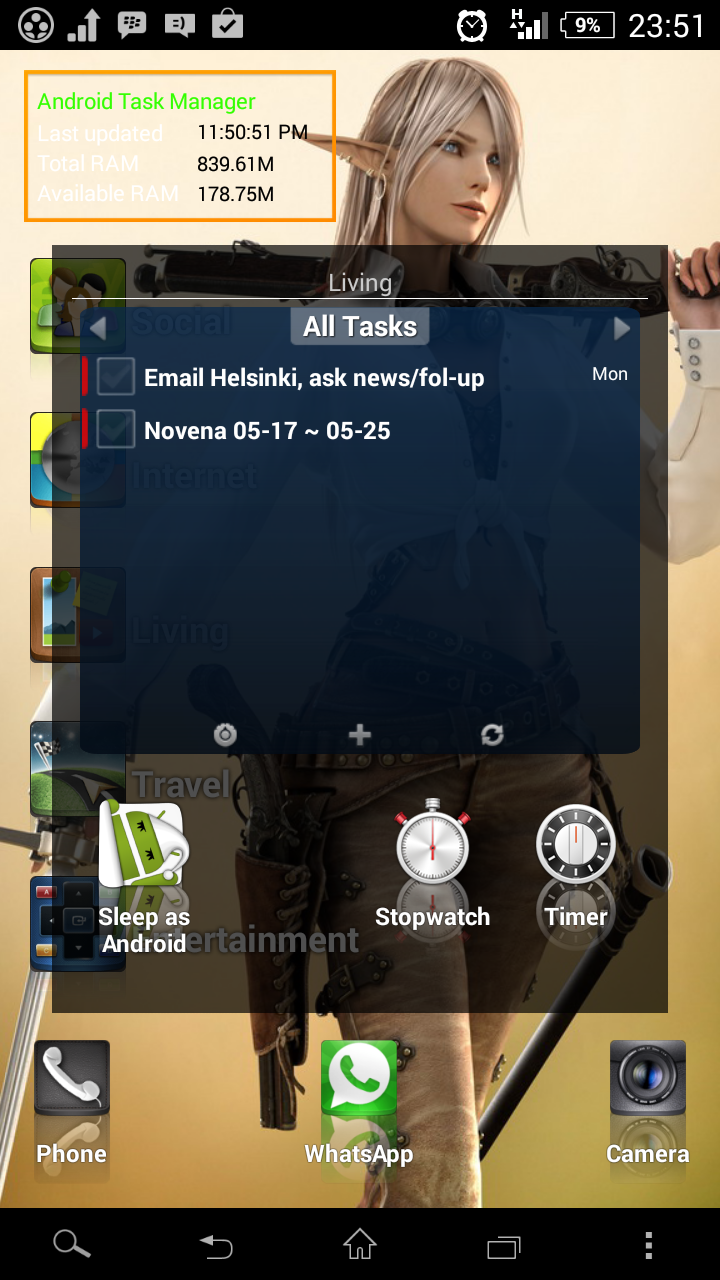
Referring to the screenshot, is there a way to shift the folders’ labels vertically?

Referring to the screenshot, is there a way to shift the folders’ labels vertically?
The “margin” option only specifies the horizontal distance between the label and the icon, but vertically the label centered itself to the height of the icon+reflection, while I want the label to be centered relatively to the icon only.
So, I suggest a feature to shift the label vertically when its position is to the side (left/right) of the icon.
Or perhaps, change the settings in the “Pos” tab to specify X & Y offsets separately, instead of a single “Margin” setting.
]]>This is my attempt at designing a Home Screen that fits the way I use my phone.
On the first screenshot, the top row is a horizontally scrolling panel, containing several half-screen-wide widgets. The middle area is a vertically scrolling panel containing folders. The bottom row is part of the original desktop, but each icon has a swipe-up gesture attached.
I also attach “Screen Off and Lock” to the empty space of the top row, and “App Dialer” to the empty space of the middle area (both using double-click gesture).
The third screenshot shows a separate desktop containing some ‘hidden’ folders, launched by swipe-up gestures from the main screen.
Edit: Icon pack using DCikonZ, phone is a Sony Xperia SP, so the funky Cameras widget seen in the 3rd screenshot comes from the ROM.


When an app is updated and its icon change, it is automatically updated in the app drawer and where placed it (or at…
But, when the name change it is not. Not automatically and not with a refresh. You need to change it manually.
Edit: in the LL app drawer it is updated. I guess this is due to the fact that LLX let you change the label. But it also let you change the icon, is it possible to leave custom label but modify default one?
]]>
Found just something cool thingy.
The stupid thing is. I can’t remember anymore how i did that.
]]>double click to launch
This is a small script I made in the alpha. I thought I had updated it…it seems I forgot 😛
But now I updated it to allow custom tap/doble tap!
Instructions:
Set the script in an event of the items you want. You may want to set it in the tap action, but nobody says you can’t set it in a swipe or something else. By default it will launch the item when single tap, and go to the main desktop when double tap. But of course you can (and may) change them to what you want, you will need to know scripting to do so.
With widgets it works ok, but the widget always get executed when tap, and perform the launch action will send a error. You can use this for example to do nothing when tap, and something when double tap (even thought the widget will get both clicks! )
———————————-
//time in milliseconds between clicks
var delta = 250;
function singletap(){
//action to execute in single tap
item.launch();
}
function doubletap(){
//action to execute in double tap
LL.goToDesktop(LL.getHomeDesktop().getId());
}
var event=LL.getEvent();
var item=event.getItem();
var id=item.getId();
var time=event.getDate();
var data = JSON.parse(LL.getScriptTag())||[-1,-1];
if(data[0]==id && time < ( data[1] + delta) ){
LL.setScriptTag(null);
doubletap();
}else{
LL.setScriptTag(JSON.stringify([id,time]));
setTimeout(function(){data2=JSON.parse(LL.getScriptTag())||[-1,-1];if(data2[0]==id&&data2[1]==time)singletap();},delta);
}
]]>Feature suggestion, new gesture, So I wanted to double tap my homescreen to open my app drawer, but I found this…
Hope that makes sense. Thanks.
Edit: Just realized I can disable clicking on the widget this still doesn’t help though because I need to tap on a certain part of the widget to do something, and disabling clicks makes that impossible but it does allow me to double tap.
]]> D5 Creation