Lutz Linke
now browsing by tag
Do folders have no OnOpen and OnClose event?
Feature request for scripting: it would be great and helpful if events could programmatically be wired.
This would allow to in OnLoad of desktop to set up the event handling.
]]>Fantastic editor. Those extra keys above the keyboard is a great functional extension.
Fantastic editor. Those extra keys above the keyboard is a great functional extension.
Can anyone help me with “runScript” and “getData”? There seems to be a problem with passing the parameter…
script1:
LL.runScript(“script2″,”myPanel”);
script2:
var d = LL.getCurrentDesktop();
var e = LL.getEvent();
var p = e.getData();
alert(p);
var i = d.getItemByLabel(p);
I have a panel labeled “myPanel” on the desktop.
I run script1 from a shortcut.
Alert shows ‘myPanel’.
getItemByLabel returns NULL.
BUT: if I directly use d.getItemByLabel(“myPanel”), the panel is found.
Is this a bug?
]]>This little free tool allows to easily change the resolution of your device.
This little free tool allows to easily change the resolution of your device.
Used it to change my Nexus 4’s 768×1280 to more common 720×1280 to prepare my template for publishing. I only changed the resolution, kept the DPI, worked good. Could avoid having to use the slow emulator.
(I know, can be done by adb shell commands, but it’s easier and does not require a PC.)
Lately had the idea to create a “getting started”-guide with LL’s folder and (a lot of) “do nothing”-shortcuts.


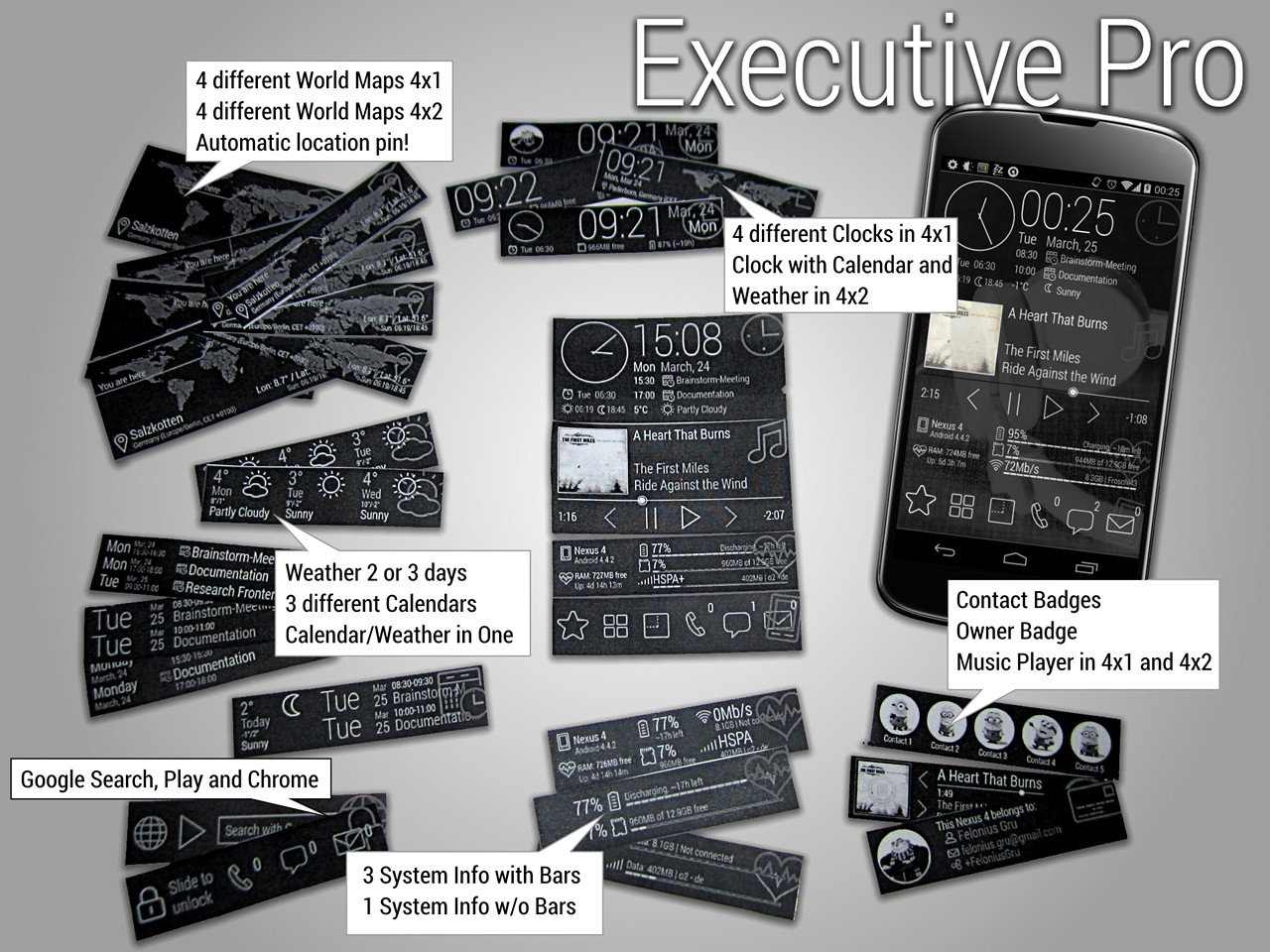
“Executive Pro” is my current template for Lightning Launcher including a huge set of 28 Zooper Widgets I just…
“Executive Pro” is my current template for Lightning Launcher including a huge set of 28 Zooper Widgets I just released on Play Store — again fully compatible with my ZW Color Styler app.
The template is exported from 720×1280, so it should work on many devices (also on 1280×1920 — not tested) out-of-the-box.
I even included a “Help Page” as quickstart guide — check it out 🙂
Watch the video to see it in action.
This time I decided to publish a free basic version (contains just the basic widgets) as well as a paid “Pro” version with all widgets.
Free version:
Calendar, Clock, Clock with Analog Clock, Google (Chrome, Play, Search), Music 4×1 and 4×2, System Info with Bars, Weather Now and 2 Days, WorldMap 4×2
Pro version:
3 different Calendar, Calendar and Weather combined, 3 Clocks 4×1 (Clock, Clock and Analog Clock, Clock and Owner Badge, Clock and WorldMap), Clock 4×2 and Today (Weather and Appointments), Google (Chrome, Play, Search), Music 4×1 and 4×2, Owner Badge, Contact Badges, 4x System Info (Battery & SD, Cell & Wifi, All with Bars, All without Bars), Weather Now and 2 Days, Weather 3 Days, 4 different WorldMap widgets (each in 4×1 and 4×2)
The location marker on the WorldMap widget is automatically positioned to your current location. The map is font-based, so you can choose between 15 different maps styles (outline, solid, rastered) by simply choosing a letter “c” to “p” in widgets setting (the layers are marked accordingly).
All icons used are also font based; they can be easily replaced, are scalable and their colors be changed. They’re the previously used licensed “Eldorado Stroke” icon by IcoJam, converted from SVGs with http://fontastic.me.
“Executive” LL(x) Template and ZW Skins (FREE):
https://play.google.com/store/apps/details?id=de.echtzeitig.lltemplate.executive
“Executive” ZW Skins (FREE):
https://play.google.com/store/apps/details?id=de.echtzeitig.zwskin.executive
“Executive Pro” LL(x) Template and ZW Skins (€0.89):
https://play.google.com/store/apps/details?id=de.echtzeitig.lltemplate.executivepro
“Executive Pro” ZW Skins (€0.79):
https://play.google.com/store/apps/details?id=de.echtzeitig.zwskin.executivepro
ZW Color Styler (FREE):
https://play.google.com/store/apps/details?id=de.echtzeitig.zwcolorstyler
Video: “Executive” LL(x) Template and Zooper Widgets



Would it be possible to add “screen on” and “screen off” events to a panels “events and actions”?
“How does scripting work???”
Well, I was about to post that question after for about an hour I struggled badly with scripting. First thought: “Hey, how hard can it be? You’re a developer pro.”… and honestly: it is hard. Very hard. Really, I was about to give up. But then decided to use my notebook side by side with my tablet.
Here are some findings and suggestions.
0) I started creating a shortcut with action “Run script”. Added some basic lines, positioning the home desktop. Surprisingly it worked.
1) Opening Editor
But how the hell to edit the script?? Took me ages and finally found the posting pointing to “Script Editor” in “All apps”. It should be easier, waaay easier to go to the editor. In my example, in the shortcut’s configuration it should be possible to launch the editor for that script.
EDIT: I see when in “+” tab “Run script” is chosen as an action for “tap” or a gesture, it is possible to enter the editor by tapping that action and choosing again “Run script”. But there’s no way if a shortcut directly is set to “LL Action >> Run script”.
2) Keyboard mode
When editong script, the keyboard should be set to “autocomplete off” or “autocorrect off”. When in Zooper editing “advanced options” (manual text also IIRC) for example it is off, so typed text is not “corrected” (here: destroyed) by the keyboard.
3) Editor or “Edit…”
Opening help in browser and going back works good so far. But was is the difference between “Edit…” and the editor I’m already in? Is it currently just an alternative to the first editor and only one will be in the final release? I’m confused.
4) “Intellisense” / Autocomplete
I’m a .NET professional and Visual Studio has stunning “Intellisense” which when just typing a few characters shows possible types, methods, etc. I do not ask for that level of guidance, but I really think there has to be be some help of any kind.
My thought: many keyboards with auto-complete feature show suggestions or alternatives in a scrollable bar. Let’s say I have a Desktop object called “dtHome”, so when I type “dtHome.” (dot at the end) a bar might show the methods and properties possible in bar (or 2 or 3 lines), which dynamically adjusts as I continue typing.
This would (for everyone, not just beginners) dramatically help editing scripts without switching back and forth between editor and help.
5) Syntax check
For fun I just entered “var test = LL.gethome();”. There was no sign (a) the casing is wrong (“getHome”) and (b) the method does not exist at all. Syntax (even rudimentary) should at least be validated when leaving the editor.
6) Syntax highlighting
Color coding objects, methods, parameters etc would help. But this is low priority since scripts probably won’t be very long.
7) Debugging
Any kind of debugging functionality would be of great help. Break points for example.
Idea:
If I set a breakpoint at a specific line, when the script is executed and the breakpoint reached, a semitransparent overlay could pop up over the desktop showing the current portion of the script.
Buttons: “Play” = continue, “Single step”. And maybe a button to switch the position of the debug overlay (top, middle, bottom should be sufficient).
I possible: a line showing an objects most useful properties (like ID, position etc) when clicked in shown code.
Well… seems though I call myself a “Pro” developer I might think about wether I’m really “Pro” when I’m already too dependent on such kind of assistance 😉
EDIT: Pierre Hébert , though I currently have no ideas for what I might do with scripting, it really is a VERY powerful feature, big thumbs up. Even if only for a few. There already are some great postings in “Scripts” section.
]]>I have one big request: Pierre Hébert , please stop working on Scripting for a while and for a while focus on bug…
Please, all, read to the end.
You all know I’m a Lightning Launcher fanatic, using it for years now. And for sure I will never ever use any other launcher! But lately I’m sad getting more and more frustrated working on templates for LLx. Really, the last weeks I trashed half a dozen or so templates I was working on. Simply because they did not work in practice as they should in theory — because of bugs and I finally gave up literally cursing and crying when I found no workarounds.
Just some simple examples:
Swipe gestures and panels
I have a panel with vertical scrolling. Swiping horizontally should scroll desktops. I does not. As workaround I even added swipe left/right gestures to the panel that scrolled to desktop shortcuts left and right. (Looked and felt terrible BTW).
Back button
Nothing much to say, reported that lately. Use shortcuts to jump from desktop to a position inside panel and your lost trying to return with “back” button.
To be honest: I did not even try any of the latest features added to LL(x). And reading the the postings the last weeks shows, new users still struggle with basic features. LLx is powerful, but it’s gettings overwhelming even for experienced users.
I don’t want to see LLx go down because it’s some day so powerful only long time hardcore users understand and newbies would need a 3 weeks training with certification to do basic stuff — leave alone handle the beast.
As much as I liked the idea of scripting, the more I think about it (I’m really sorry to say that): I don’t think it is the right way. How many users would (and could) use scripting finally? About 1%? … and how many of those would do something useful with it?
I currently have the feeling too much energy in LLx development i spent in the wrong direction. Especially when those little bugs keep crawling out and disturbing my every day life with LLx.
]]> D5 Creation