Lutz Linke
now browsing by tag
Experiment based on Ren Shore ‘s Material Ripple script. Not sure where this is leading to, but have some ideas.

Experiment based on Ren Shore ‘s Material Ripple script. Not sure where this is leading to, but have some ideas.
]]>ZW WeatherGraph Widgets
ZW WeatherGraph Widgets
ZW files are now ready for download.
I did some optimizations to the lately teased (https://plus.google.com/u/0/+LutzLinke/posts/RRrC6QtZWK6) WeatherGraph widgets, now they look pretty good:
– scaling no longer 0°C-based, focus on current min/max area
– horizontal line gone (0°C, no longer needed)
– added dynamic scale
– created a whole bunch of sample widgets
Download here:
https://app.box.com/s/yextrr7js9xupu9y90ovacmjwvc1ikwt
Some technical stuff for those interested:
– (ceil(max(#W0MAXN#;[..];#W6MAXN#)/5)*5 – floor(min(#W0MINN#;[..];#W6MINN#)/5)*5)
Min/Max-range for scaling. Min/max values are rounded up/down to 5°. Made adding the vertical scale easier. Also looks better then using absolute range (i.e. instead of absolute range -3°C to 11°C = 14°C we use -5°C to 15°C = 20°C).
Hint: to revert to 0°C-based scaling, 0 has to be added to the list, i.e. max(0;#W0MAXN#;[..];#W6MAXN#)
– sample: [oy]$(30 + (#W0MAXN# -floor(min(#W0MINN#;[..];#W6MINN#)/5)*5) / (ceil(max(#W0MAXN#;[..];#W6MAXN#)/5)*5 – floor(min(#W0MINN#;[..];#W6MINN#)/5)*5) * 100)$[/oy]
30 is the absolute offset from widget’s bottom (all items are aligned “Center Bottom”).
(W0Max -floor(…)) is the current max temperature relative to absolute min temperature.
Relative offset value is divided by min/max-scale.
” * 100″ finally scales to the pixel-range to use.
Calculations for graph:
[r]$(atan((#W3MINN#-#W2MINN#) * 100/(ceil(max(#W0MAXN#;[..];#W6MAXN#)/5)*5 – floor(min(#W0MINN#;[..];#W6MINN#)/5)*5) / 75) * -180 / pi)$[/r]
[rw]$(75/cos(atan((#W3MINN#-#W2MINN#) * 100/(ceil(max(#W0MAXN#;[..];#W6MAXN#)/5)*5 – floor(min(#W0MINN#;[..];#W6MINN#)/5)*5) / 75)))$[/rw]
75 is the width if the line was horizontal without rotation (the “Ankathete” = adjacent side of the triangle’s angle).
Arcus Tangens calculates the angle of the graph via the temperature difference (“Gegenkathete” = opposite side of the angle).
Cosinus finally calculates the new length of the rotated line (=rect width).
Tipps for editing:
– “Batch editing” on PC
Copy the ZW file to my PC. AirDroid or PushBullet come handy for doing so.
It’s a ZIP-archive, so extract all JSON-files included to a folder.
Open all JSON-files in the free editor Notepad++.
Now it’s possible search and replace values in all opened files at once.
Save all, then replace the files in the ZW-file. Do NOT create a new ZIP!!
Copy back to phone and load in ZW to see the results.
– Moving horizontally
All graph items can be moved horizontally (x-axis) easily. However the lengths of the graphs need to be adjusted.
You can do this by replacing the base value 75 in their calculations by, i.e. 60 if you reduced the spacing by 15.
It’s the JSON files with “pref_module_name” like “Min Line” and “Max Line”.
– Changing horizontal scaling
In all JSON files the string “* 100” can be replaced with i.e. “* 75” or what ever your desired new height is.
– Change offset from bottom
I suggest using search for “[oy]$(” and replace with i.e. “[oy]$(10 + ” if you want the graph to be positioned 10 pixels higher.


WIP: Weather Graph for Zooper Widget
WIP: Weather Graph for Zooper Widget
Because… I can.
Not satisfied yet, something is still missing. Scale on vertical axis or something. Also layout is not quite right I feel. But functionally it’s working pretty good so far.


Damn, I uploaded 4 videos and only the first one is shown in the post.

Damn, I uploaded 4 videos and only the first one is shown in the post. Here are the others, incl one “near-real-life-sample”:
https://plus.google.com/photos/106201536507820539535/albums/6111768607528079185
Originally shared by Lutz Linke
Swap Cards-Script with Accordion- or Stack-Effect – Version 3
I was busy and added some requested (and non-requested) features.
– Alpha Fading : Cards removed/added can be faded out/in (var cardFadeOut=true;)
– Faded lower cards : Cards not in focus can be alpha faded (var cardAlphaLower=128;)
– Variable Overlap : Overlap (the shows part in proportion of row height/column width) can be adjusted (var cardOverlapSize=1.0;)
– External Triggers : Triggers can be placed outside of the panels, i.e. on desktop or in a different panel. Panels can reside on desktop or inside another container (var cardContainerName=”pnlStack”;). Name is used to match card (i.e. “btnCard01” >> “pnlCard01”)
– Swipe Gestures : Swipe gestures on desktop and items (i.e shortcuts) can be used to trigger swap up/down the stack (set name “prefix{NEXT}” or “prefix{NEXT}”)
– “Cards” must not be panels, but can also be items, i.e. shortcuts
– Fixed bugs in AnimateItems script
– Wrapper : a “wrapper” script can be used to change any parameters of the original script without need to change it
– Reverse direction for Stack : cards on the lower half will by default be pushed to top in reverse order (“pulled from bottom”) automatically, but direction can be set fixed to “U”p or “D”own (i.e var cardFixedDirection=”U”;);
– *Fixed Orientation” : if automatic detection of horizontal or vertical stack fails, the orientation can be fixed (i.e var cardFixedOrientation=”H”;)
Example for wrapper script:
var param={};
param.cardPanelPrefix=”pnlMyCard”;
param.cardTriggerPrefix=”btnMyCard”;
param.cardContainerName=”pnlMyStack”;
var evt=LL.getEvent()
param.evtSource=evt.getSource();
var evtItem=evt.getItem();
if(evtItem!=null) {
param.evtItemId=evtItem.getId();
}
LL.runScript(“Cards_SwapAccordion”,JSON.stringify(param));”,”flags”:0,”id”:1}
(Cards prefixed with “pnlMyCard” will be searched in panel named “pnlMyStack” (fallback to desktop if not found) and buttons prefixed with “btnMyCard” will be recognized as triggers.)
See the videos, I also added an example how to use non-panel items (her: headers as “do nothing”-shortcuts) as secondary stack.
Template (download and place ZIP in /sdcard/LightningLauncher) and scripts can be downloaded from here: https://app.box.com/LLCardSwapDemo
Reference post: http://goo.gl/3vvFKz
]]>In 10.6.5 swiping left on desktop fires “C_SWIPE_RIGHT” and vice versa.
Swap Cards-Script with Accordion- or Stack-Effect

Swap Cards-Script with Accordion- or Stack-Effect
Scripts and 2-Desktop-Demo-Template are ready for download here:
https://app.box.com/LLCardSwapDemo
The template can be merged with exiting setups, won’t leave much of a trace. Just remove the desktops and propably the scripts.
This video shows how to change basic settings in the scripts and how they influence the effect.
Main settings are:
var cardPanelPrefix=”pnlCard”; : Panels to be used for swapping must use this prefix in their name (“+”-tab), i.e. “pnlCard01”.
var cardElasticity = 0.5; : Amount of space between animated cards. Lower value=closer, higher vslue=further.
var fxAnim=”P”; : Animation Style/Curve: “L”inear, “P”ower (x^pow), “E”xponential (base 2), “B”ack (little bounce).
var animDelay = 0; : Animation delay per step in milliseconds
var animSteps = 32; : Steps to use for animation
Additional settings for Card Stack:
var cardFadeOut=true; : Fade out cards when removing from top of stack.
var cardSwapOutLength=0.75;var cardSwapInLength=0.5; : Duration of swap in/out (portion of animSteps).
How to use:
(1) add panels and name them properly with prefix (“pnlCard01”, etc)
(2) add shortcut that trigger the script to each panel
(3) add “run script” actions (i.e. to tap-event), choose SwapAccordion or SwapStack script
(4) position panels, align horizontally (same y-position) or vertically (same x-position) as you wish
(5) that’s all
Tipps and Tricks:
(1) One shortcut per panel with “tap”-event set to SwapAccordion and “swipe left”-event set to SwapStack works pretty good.
(2) Important is the panel’s alignment, but not their width/height; variations are pretty interesting.
The scripts:
Cards_SwapAccordion.js : Swaps cards with Accordion-effect. Prepares parameters for Animation Engine.
Cards_SwapStack.js : Swaps cards with Card Stack-effect. Prepares parameters for Animation Engine.
Cards_AnimateItems.js : Generic Animation Engine. To be called via RunScript with parameters passed defining the animations to perform (what? how? choreography etc).
Post with short demo video here: http://goo.gl/aAJZWl
Original thread that inspired here: http://goo.gl/MvWyMW
]]>DEMO for scripted card switching. Accordion-style or Stacked.

DEMO for scripted card switching. Accordion-style or Stacked.
In response to https://plus.google.com/u/0/112116934238314159117/posts/KhZQYMEJr2q
Will upload template with sample screens and scripts with description this evening.
Pradeep Joshi is this like you have in mind?
]]>Finally.
Finally… here’s “Companion”, my new template for Lightning Launcher I worked on over the last months. Don’t judge by the pictures, watch the video, there’s animations and transitions everywhere. Enjoy.
WARNING: It is not recommended to install on devices with resolution higher then 1080×1920, since higher memory usage might cause instabilities, even freeze or crash LL. I’m sorry. I will try to optimize the template.
Originally shared by Lutz Linke
“Companion” for Lightning Launcher eXtreme
Now on Google Play Store …and: IT’S FREE!!!
https://play.google.com/store/apps/details?id=de.echtzeitig.lltemplate.companionhome
Designed for phones with 1080×1920 resolution, but also works on other 9:16 ratio like 720×1280.
Short promotional video here:
To get you started, here’s a more lengthy feature guide: http://youtu.be/Zme2rwdv4b0
For more information and support, please visit (and join) my community “echtzeitig apps” (https://plus.google.com/communities/110806742565956815090)
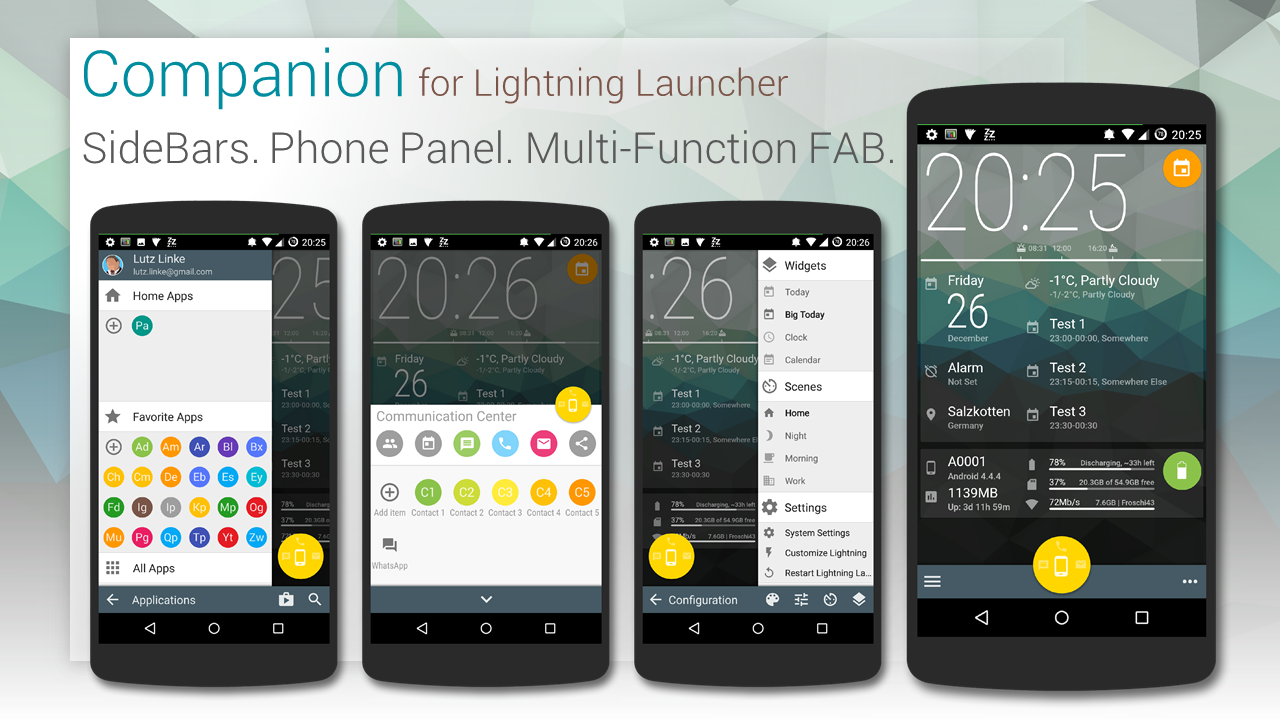
“Companion” is your daily companion template for Lightning Launcher:
– FAB (REALLY floats; visualizes missing calls, SMS and GMail; swipe gestures for quickly launching the apps)
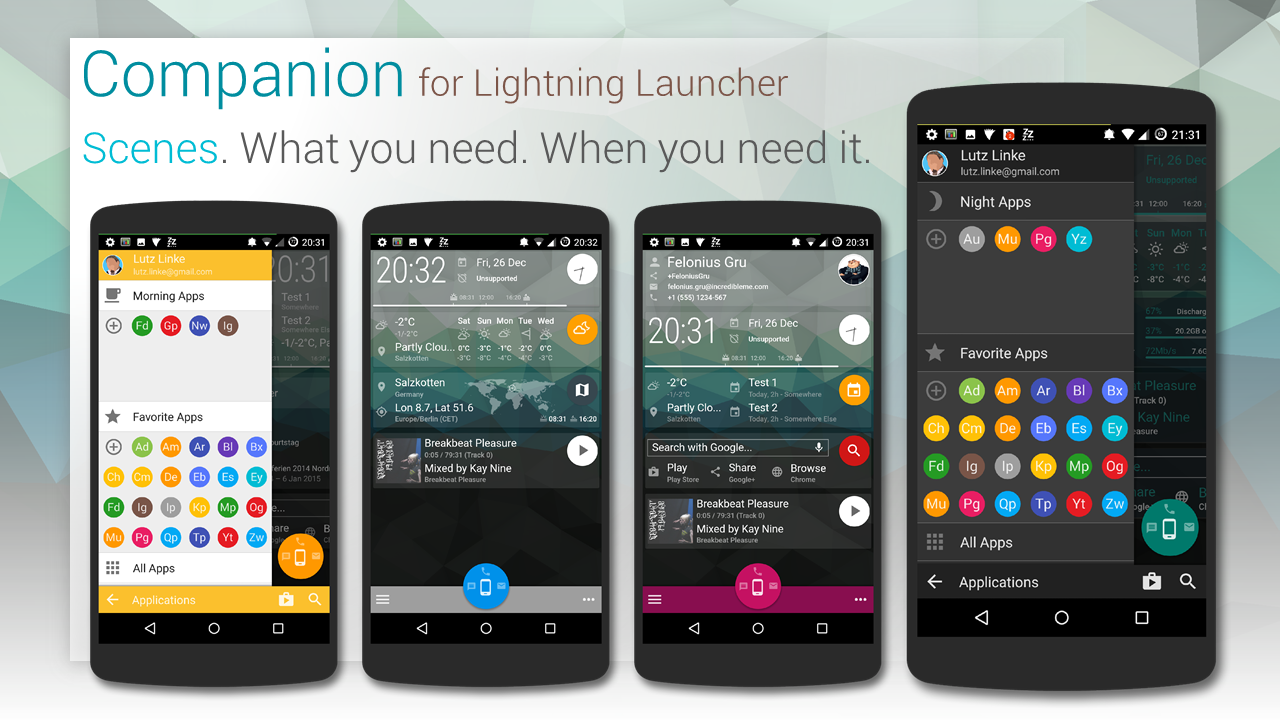
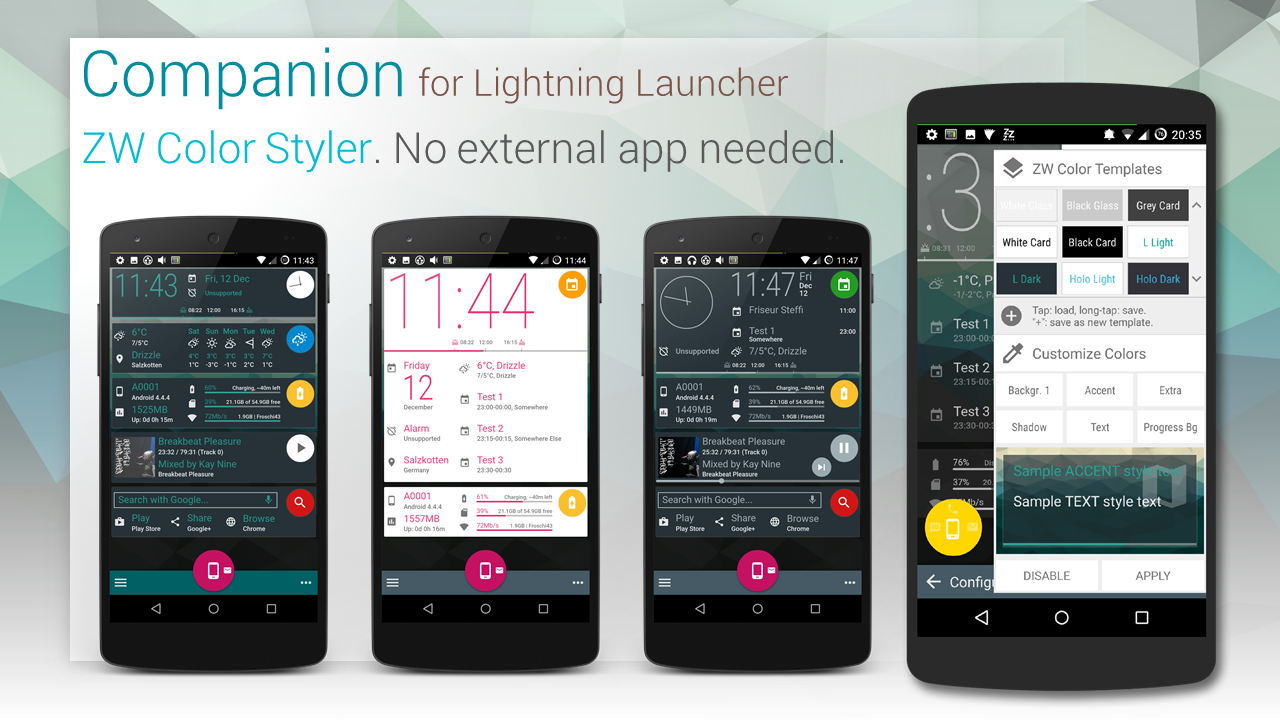
– Scenes (for many occasions: home, work, morning, night, travel, …; store your layout; scene specific sidebar folder; set specific colors per scene)
– Widgets (add, move, remove predefined or custom widgets; store layout in scene)
– SideBars (Left: favorite and scene-spscific apps; Right: widgets, scenes, settings)
– Phone Panel (Communication apps; your favorits contacts)
– Scene Scheduler (switch scenes automatically; define a schedule for scenes)
The location marker on the WorldMap widget is automatically positioned to your current location. The map is font-based, so you can choose between 15 different maps styles (outline, solid, rastered) by simply choosing a letter “c” to “p” in widgets setting (the layers are marked accordingly).
Also included:
– some wallpapers with Wallpaper Chooser and (optional) adjustable blur
– Icon Pack for compatible launchers (do NOT apply!! icons must be chosen manually!)


 D5 Creation